

Like any other industry, higher education needs to continually nurture relationships with leads.
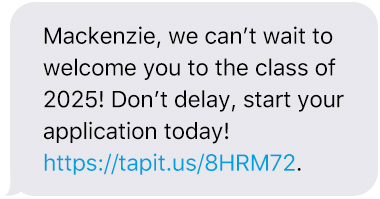
2. Start the Application or Enrollment Process via Text
Sometimes boosting enrollment is as easy as a simple text. Keep students on schedule with trackable links that will show which messages are landing. Links streamline the process as well, giving students a quick way to begin the paperwork (as opposed to hunting down the site on their own).
3. Use Keywords & Sign-Up Forms to Build a Text List of Prospective Students
Encourage prospects to opt in to your database by promoting custom Keywords and website Sign-Up Forms. With a Keyword campaign, you can build a much more targeted audience that will be receptive to your messaging.
But what is a Keyword? In short, it’s a word or phrase used to promote your text message marketing program.
Promote these messages at college fairs and counseling offices — as well as on social media, brochures, catalogues, signage, emails, flyers, and your website. Consider direct and to-the-point messaging like: “Text FRESHMAN to 858585 to get updates on incoming Freshman Orientation Welcome Week.”
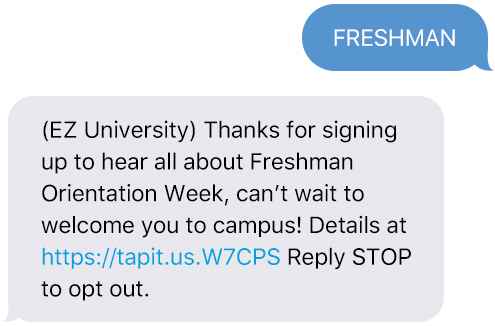
Here, FRESHMAN is the Keyword and 858585 is the dedicated short code or textable number. After texting the Keyword to the short code or 10-digit textable number, the new contact’s mobile number will be automatically subscribed to your text messaging list.
Like signing up for an email subscription, Keywords allow contacts to easily join into your SMS database and agree to receive ongoing text communications. As a bonus, it’s also a simple way to maintain legal compliance.

Editor’s note: This piece by Lauren Goldenberg originally appeared online on the EZTexting blog and is reposted here with permission.
- Using student housing to sharpen your retention strategy - September 23, 2026
- Preparing with confidence: Reflections on the dissertation proposal defense - September 18, 2026
- Beyond the gotcha game: Moving from AI detection to verification-first supports stronger academic integrity - September 16, 2026